API Configuration
In Global System Settings (which you’ll find under the “System Configuration” section of the Welcome menu), you can define a variety of system-wide settings and controls. Within the “Area Tools” menu, you’ll find links to a variety of tools that also enable global changes throughout your WCONLINE site. The first tool, “API Configuration,” allows you to automatically export WCONLINE data for use on an institutional website or within an institutional data warehouse.
The API’s ease-of-use and “custom” option would make combining WCONLINE data and institutional datas, outside of WCONLINE, nearly instant. (Note that, with students’ unique institutional email addresses and the option to import data if you use SSO, you can ensure that you always have a key field that identifies each student.)
API Access
Section titled “API Access”WCONLINE includes built-in reports and an export, all of which work quickly and report up-to-the moment data whenever used. WCONLINE’s API allows you to request and receive system data in JSON format without being logged into the system. This is mostly useful to IT departments that wish to import WCONLINE data regularly into another system, such as into a learning management system or advising tool (where email address can be used as the key field to sync data between the systems). Your IT department can set up the API to make the following datasets available:
- APPT: This is a list of appointment data for a given date. The following fields are returned for this API call: Client First Name, Last Name, and Email Address; Schedule Title; Staff or Resource Name; Appointment Date, Start Time, and End Time; Walk-In; No-Show; Placeholder; Online; and, Focus (if focus is required).
- AVAIL: This is a list of appointments currently available (to non-administrators) for a given date. The following fields are returned for this API call: Schedule Title; Appointment Date and Start Time; and, Staff or Resource.
- CRF: This is a list of client report form data for a given date. The following fields are returned for this API call: Client First Name, Last Name, and Email Address; Schedule Title; Staff or Resource Name; Appointment Date, Start Time, End Time, and Length (as recorded on the client report form); and, Off-Schedule (for off-schedule reports).
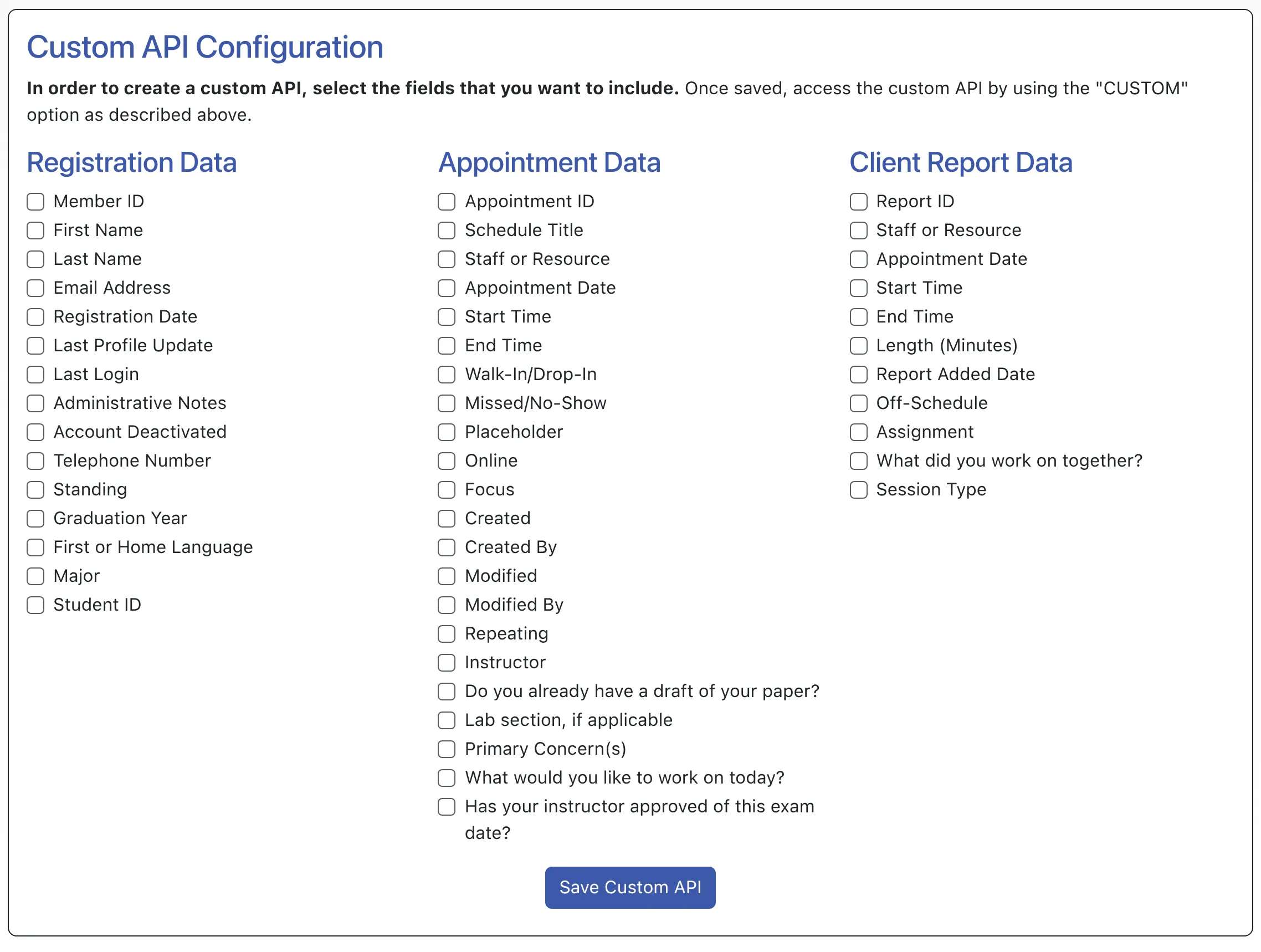
- CUSTOM: This is a list of data that you can define below the API setup and description. You can include any registration, appointment, and/or client report form fields.
- ORPHAN: This is a list of appointment data for a given date for appointments which do not have associated client report forms. The following fields are returned for this API call: Client First Name, Last Name, and Email Address; Schedule Title; Staff or Resource Name; Appointment Date, Start Time, and End Time; Walk-In; No-Show; Placeholder; Online; and, Focus (if focus is required).
As with all control panels, be sure to hover over the question mark icons next to each option for more information about each entry.
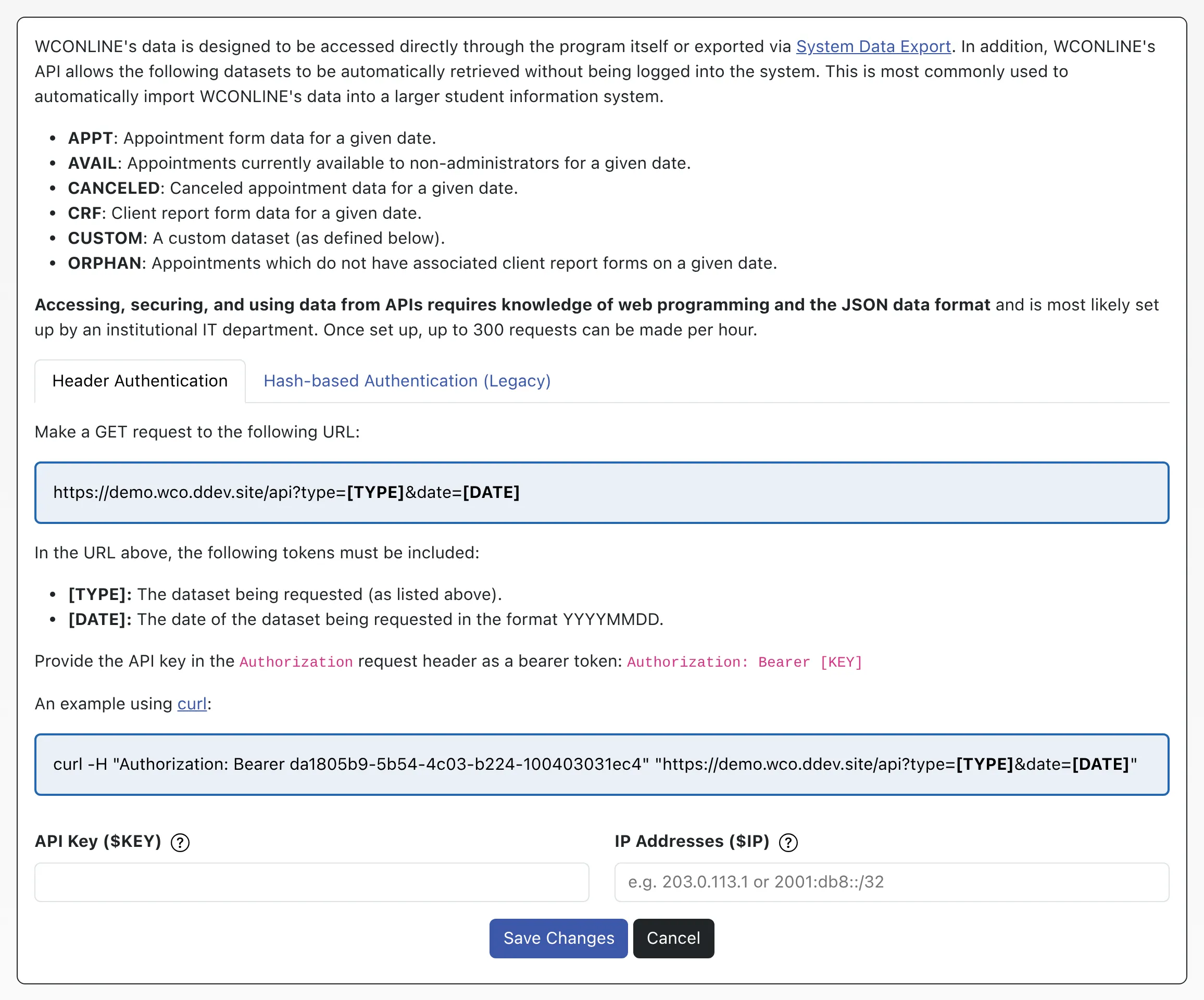
While the section contains extensive information, there are only two values to enter:
API Key ($KEY): This is the case-sensitive, ten-or-more-character string that is used for authentication. We automatically generate a random UUID as an initial key but you may also specify your own.
IP Addresses ($IP): This is the public IPv4 address of the computer which will be requesting data from WCONLINE’s API. Requests that originate from a different IP will receive an error. You may leave this field blank if you do not want to restrict which IPs can use the API.
The API configuration page will provide the URL for making an API request along with instructions for the parameters including authentication.
For complete developer documentation, see the API Reference: the request endpoint, query parameters, authentication, rate limits, and the response format for every dataset, plus a downloadable OpenAPI specification.
Below the API setup and instructions, you can define your custom API by choosing any (or all) checkboxes to include fields, including specific registration, appointment, and client report data fields.
Accessing, using, and displaying data from APIs require technical knowledge of web programming and the JSON data format. Most likely, this data will be pulled from WCONLINE and made available for use by an institutional IT department. Additionally, questions about pulling and using the data accessed through the API would need to be directed to the institution’s IT department, as we do not have access to the tools and systems available to work with data pulled from WCONLINE. Note that you are responsible for the use and security of the data once it is accessed and pulled from WCONLINE. Also note that the API system will only allow 300 requests per hour. Subsequent requests will return an error.